


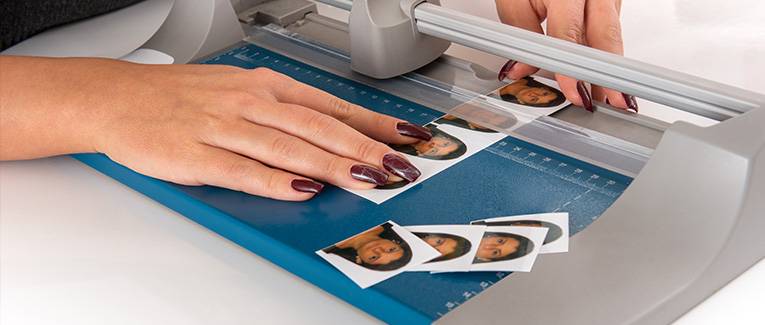
A compliant photo is required for many U.S. visa, green card, Diversity Visa, and U.S. passport applications. Although the photo requirements are essentially the same, applicants should review the photo instructions for their specific application.
Quick Photo Requirements: Do’s and Don’ts
Do
- Submit a color photo taken within the past six months.
- Use a plain white or off-white background.
- Face the camera directly with your head centered.
- Keep your full face visible and both eyes open.
- Use even lighting without shadows.
- Wear clothing normally worn each day.
- Submit a clear, high-resolution, unedited photo.
- Follow the photo instructions for your specific application.
Don’t
- Wear eyeglasses unless a rare, medically documented exception applies.
- Use AI tools, phone apps, filters, retouching, or background-removal software.
- Correct red eye or digitally alter your face, skin tone, lighting, or shadows.
- Wear uniforms, camouflage, unauthorized head coverings, or face coverings.
- Wear headphones or wireless hands-free devices.
- Submit blurry, grainy, damaged, photocopied, or images scanned from official documents.
- Include another person or distracting object in the photo.
U.S. Visa and Green Card Photograph Specifications
Photo Age and Appearance
- Use a photo taken within the past six months.
- Make sure the photo reflects your current appearance.
- Replace the photo after a significant change in appearance.
Lighting and Shadows
- Use even lighting across your face.
- Keep your face and background free of shadows.
- Avoid lighting that makes the photo too bright or too dark.
- Make sure skin tones appear accurate.
Pose and Expression
- Face the camera directly without tilting your head.
- Keep your full face and both eyes clearly visible.
- Use a neutral expression or natural smile.
- Keep your mouth closed and avoid exaggerated expressions.
Clothing, Head Coverings, and Accessories
- Wear clothing normally worn each day.
- Do not wear uniforms, camouflage, or clothing resembling a uniform.
- Remove hats and head coverings unless worn for religious or medical reasons.
- Keep your full face visible when wearing an approved head covering.
- Remove face coverings, headphones, and wireless hands-free devices.
- Hearing devices, jewelry, and facial piercings are allowed when they do not hide your face.
Eyeglasses
- Remove prescription glasses, reading glasses, sunglasses, and tinted glasses.
- Include a signed medical statement when glasses cannot be removed for medical reasons.
- Make sure frames, glare, shadows, or refraction do not obscure your eyes under an approved exception.
Background
- Use a plain white or off-white background.
- Keep the background free of shadows, textures, lines, and objects.
- Stand several feet away from the wall to reduce shadows.
Resolution and Quality
- Submit a clear, high-resolution color photo.
- Avoid blurry, grainy, pixelated, or damaged photos.
- Do not submit photocopies or photos scanned from official documents.
- Retake a photo with red eye instead of correcting it digitally.
Digital Changes
- Submit the original, unchanged photo.
- Do not use AI tools, software, phone apps, filters, or retouching tools.
- Do not remove or replace the background digitally.
- Do not smooth skin, reshape facial features, or alter lighting, shadows, or skin tone.
Babies and Toddlers
- Make sure no other person appears in the photo.
- Place the child on a plain white or off-white sheet, or cover a car seat with one.
- Keep the child’s full face visible and free of shadows.
- The child should face the camera with a neutral expression.
- A baby’s eyes do not need to be fully open, but older children must have their eyes open.
Sample Photographs
Acceptable Visa Photos
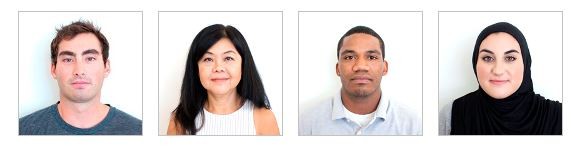
A compliant photo should clearly show the full face, with proper lighting, positioning, background, and image quality.
Shadows and Lighting


Use even lighting across the face and background. Avoid shadows, overexposure, and underexposure.
Glasses


Prescription glasses and sunglasses are not allowed. Passport photo rules eyeglasses requirements permit only rare, medically documented exceptions.
Size and Position


Center the head and shoulders within the frame. Follow the required measurements, including the applicable visa or green card photo size.
Resolution, Print Size, and Quality


Submit a clear, high-resolution image without blur, grain, visible printer dots, damage, or red eye.
Digital Alternations and Retouching


Submit the original, unchanged image.
Critical Note: Effective October 2025, the AI photo editing ban prohibits photos changed with artificial intelligence, phone apps, filters, retouching tools, or background-removal software. Digital changes may result in rejection.
Pose and Expression


Face the camera directly with the head straight and both eyes visible. Use a neutral expression or natural smile with the mouth closed.
Attire, Hats, and Hair


Wear normal daily clothing and keep the full face visible. Hair, hats, scarves, and other items must not obscure facial features.
Background


Use a plain white or off-white background without shadows, textures, lines, objects, or other people.
Child


Only the child may appear in the photo. Keep the child’s face visible, unobstructed, and directed toward the camera.
Nonimmigrant Visa Photo Requirements
Applicants completing Form DS-160 or Form DS-1648 must upload a digital photo as part of the online application. Review the US visa photo requirements before uploading the image.
If an “X” appears instead of the photo on the confirmation page, the upload failed. Bring one compliant printed photo to the U.S. embassy or consulate.
Some embassies and consulates require one printed photo even after a successful upload. Review the photo instructions for the location of the visa interview.
Immigrant Visa Photo Requirements
Applicants completing Form DS-260 must bring two identical printed photos to the immigrant visa interview.
Each photo must be printed on photo-quality paper and measure 2 x 2 inches, or 51 x 51 millimeters.
Diversity Visa Program Photo Requirements
Diversity Visa entrants must upload a digital photo with the online entry.
The photo must:
- Be in JPEG (.jpg) format.
- Be square and measure 600 x 600 pixels.
- Have a file size of 240 kilobytes or less.
An existing printed photo may be scanned when it measures 2 x 2 inches, or 51 x 51 millimeters, and is scanned at 300 pixels per inch, or 12 pixels per millimeter.
Applicants selected for the Diversity Visa Program must bring two identical printed photos to the interview.
Photo Image Requirements
Paper and digital photos have different technical requirements. Follow the instructions for the photo format required by the application.
Paper Photo

- Print the photo on matte or glossy photo-quality paper.
- Use a photo size of exactly 2 x 2 inches or 51 x 51 millimeters.
- Make sure the head measures between 1 inch and 1 3/8 inches, or 25 to 35 millimeters, from the bottom of the chin to the top of the hair.
- Position the eyes between 1 1/8 inches and 1 3/8 inches, or 28 to 35 millimeters, from the bottom of the photo.
Digital Photo

- Use a square image between 600 x 600 pixels and 1200 x 1200 pixels.
- Make sure the head occupies 50% to 69% of the image height, measured from the bottom of the chin to the top of the head, including the hair.
- Save the image in JPEG (.jpg) format.
- Keep the file size at 240 kilobytes or less.
- Use the sRGB color space.
- Use compression of 20:1 or less when compression is necessary.
Where to Get Photographs Taken
A professional photo service is recommended because U.S. visa, green card, and passport photos must meet strict size, lighting, background, and image-quality requirements.
In the United States, photo services may be available at FedEx Office, Walgreens, CVS, or a local photography studio.
Applicants who take their own photos should review every requirement carefully. A noncompliant photo may delay the application or require a replacement.

New Immigrants Insurance
Get QuotesFor visitors, travel, student and other international travel medical insurance.
Visit insubuy.com or call +1 (866) INSUBUY or +1 (972) 985-4400Appearance Change
A new photo may be required even when the current photo was taken within the past six months if your appearance has changed significantly. Significant facial surgery or trauma, large facial piercings or tattoos, and major weight loss or gain may require a new photo.
Minor changes, such as growing a beard or changing hair color, do not require a replacement as long as you remain clearly identifiable. Children under age 16 do not need a new photo because of normal growth.
Final acceptance remains at the discretion of the U.S. embassy, consulate, Department of State, or USCIS.